Nordstrom

Nordstrom

Nordstrom

Nordstrom Inc.

Usability Testing

Nordstrom Appointment Booking Optimization

ROLE

Partnering with Nordstrom Design & Research Team, I evaluated the iOS appointment booking system used by 90+ Nordstrom flagship stores, to uncover where conversion risks were most prevalent especially when in-store visits are increasingly optional for consumers.

TIMELINE

10 weeks

Q2-2024

TEAM

4 Researchers

2 Nordstrom UXR

SKILLS

Task Design & UX Design

Moderated Usability Testing

Nordstrom Inc.

Usability Testing

Nordstrom Appointment Booking Optimization

ROLE

Partnering with Nordstrom Design & Research Team, I evaluated the iOS appointment booking system used by 90+ Nordstrom flagship stores, to uncover where conversion risks were most prevalent especially when in-store visits are increasingly optional for consumers.

TIMELINE

10 weeks

Q2-2024

TEAM

4 Researchers

2 Nordstrom UXR

SKILLS

Task Design & UX Design

Moderated Usability Testing

PROBLEM

Nordstrom’s appointment is an opportunity to change a one-time shopping trip into a lifetime customer relationship.

Customers book 1-on-1 consultation with stylists on the iOS app. Having a positive experience gives users special reasons to return and drive more deliberate purchase.

Tailoring

Styling

Beauty

PROBLEM

However, most customers abandoned the booking on the mobile app

To investigate product risks in detail, we scoped a 3-weeks in person moderated sessions with long-term and new customers, covering initial discovery to rescheduling stage. In this phase, I coordinated participant recruitment, led whiteboarding sprint for test structure and conducted 70% of the sessions.

FINDING

Participants struggled to get to appointments quickly, were left unsure of the service types and failed to reschedule when given time conflict.

As part of whiteboarding, we broke the entire flow into 7 core tasks: assigned scenarios instead of a usual checklist to complete. During this phase, we prioritized task success rate, task error rate, perceived task difficulty, System Usability Scale (ISO 9241) and post-task interview: qual and quant.

SOLUTION

Building on Nordstrom's prioritization framework, we presented data led findings and 10 solutions to 50+ Nordstrom stakeholders from product, engineering and styling.

To wrap up this partnership, I owned the recommendations and spearheaded the presentation storyline, while my team had each section of task and data wrangling. I presented those recommendations along with data-backed findings for the stakeholders meeting.

Retrieving confirmation is even harder

Retrieving confirmation is even harder

T1 and T7 were perceived as most difficult tasks, 

ranked lowest on ease of completing task.

T1 and T7 were perceived as most difficult tasks, 

ranked lowest on ease of completing task.

Very Easy

Very Easy

Very Difficult

Very Difficult

T1

Finding

Appointment

T1

Finding

Appointment

T7A

Reschedule

Appointment

T7A

Reschedule

Appointment

T7B

Cancel

Appointment

T7B

Cancel

Appointment

T1 Store

T1 Store

Success

Success

Success but struggled

Success but struggled

Fail

Fail

Fail but assume success

Fail but assume success

T3 Selecting

T3 Selecting

Novice (4/6)

Novice (4/6)

Expert (2/6)

Expert (2/6)

T1: Finding Booking

T1: Finding Booking

T2: Select Service

T2: Select Service

T3: Select Staff

T3: Select Staff

T4: Select Availability

T4: Select Availability

T5: Add Personal Info

T5: Add Personal Info

T6: Review Confirmation

T6: Review Confirmation

T7A: Reschedule

T7A: Reschedule

T7B: Cancel

T7B: Cancel

0%

0%

25%

25%

50%

50%

75%

75%

100%

100%

0%

0%

25%

25%

50%

50%

75%

75%

100%

100%

Novice (4/6)

Novice (4/6)

Expert (2/6)

Expert (2/6)

T1: Finding Booking

T1: Finding Booking

T2: Select Service

T2: Select Service

T3: Select Staff

T3: Select Staff

T4: Select Availability

T4: Select Availability

T5: Add Personal Info

T5: Add Personal Info

T6: Review Confirmation

T6: Review Confirmation

T7A: Reschedule

T7A: Reschedule

T7B: Cancel

T7B: Cancel

0%

0%

25%

25%

50%

50%

75%

75%

100%

100%

0%

0%

25%

25%

50%

50%

75%

75%

100%

100%

Retrieving confirmation is even harder

T1 and T7 were perceived as most difficult tasks, 

ranked lowest on ease of completing task.

Very Easy

Very Difficult

T1

Finding

Appointment

T7A

Reschedule

Appointment

T7B

Cancel

Appointment

T1 Store

Success

Success but struggled

Fail

Fail but assume success

T3 Selecting

Novice (4/6)

Expert (2/6)

T1: Finding Booking

T2: Select Service

T3: Select Staff

T4: Select Availability

T5: Add Personal Info

T6: Review Confirmation

T7A: Reschedule

T7B: Cancel

0%

25%

50%

75%

100%

0%

25%

50%

75%

100%

Novice (4/6)

Expert (2/6)

T1: Finding Booking

T2: Select Service

T3: Select Staff

T4: Select Availability

T5: Add Personal Info

T6: Review Confirmation

T7A: Reschedule

T7B: Cancel

0%

25%

50%

75%

100%

0%

25%

50%

75%

100%

Participants

Participant Criteria

•iOS user
•Ages 18+
•Nordstrom customers
•$500+ annual spend on beauty, skincare, & clothing
•Experience/interest in services
Novice (4)
Experts (2) - experience booking appointments
P1P3P4P6P2P5

4 novice · 2 experienced appointment bookers

Participants were adult iOS users and Nordstrom customers with experience or interest in services. Ages: 18–25 (1), 26–31 (3), and 40+ (2).

The screener listed $500+ annual spend. The observed sample included one participant at $300–500 and five over $500.

The end-to-end journey

Task 1

T1

Appointment Booking Discovery

Scenario: You’re getting ready to attend a wedding on the evening of March 30th and you would like to get your makeup done professionally at Nordstrom for the event.

T1Find Appointment Booking
T2Select Service
T3Select Staff
T4Select Availability
T5Add Personal Info
T6Review Confirmation
T7Reschedule Booked Appointment

Task 1

Finding 1.2

Search results don’t bring participants to appointments which caused them to give up

Frequency

•2/6 participants (over age 40) expected to find appointments through search

“In the search function. I start with makeup appointments. And it gives me a bunch of makeup. Which I don't want. So I try and search again…. I'd probably give up at this point” [P4]

Severity: High

Task 1

Recommendation 1.1

Make it easier for users to find appointments on ‘Store’ page

1.Reorganize store address & phone number to surface appointment above scroll line
2.Surface services in carousel
•Consider testing empty state
Severity: High
Quick FixLong Term

Task 1

Recommendation 1.2

When users search for queries related to "appointment"

1.Show a direct path to appointments in autocomplete
Severity: High
Quick FixLong Term

Task 1

Recommendation 1.2

Include services or appointments in search results

Severity: High
Quick FixLong Term

Task 3–4

T3–4

Selecting Staff

Selecting Availability

T1Find Appointment Booking
T2Select Service
T3Select Staff
T4Select Availability
T5Add Personal Info
T6Review Confirmation
T7Reschedule Booked Appointment

Task 3

Recommendation 3

To make it easier for people to find a desired staff, consider adding more staff information

•Staff’s bios (3/6)
•Staff’s expertise (2/6)
•Staff’s years of experience (2/6)
•Staff’s makeup style / Social media links (2/6)
Severity: Medium
Quick FixLong Term

Task 4

Finding 4

While participants who selected “no preference” found availability, others found their desired staff unavailable

1. Lack of availability

•2/3 participants found their desired staff unavailable after reaching “Select Availability” screen
Severity: Medium

Task 4

Recommendation 4

•To avoid switching between screens, consider combining Step 1 “Select Staff” and Step 2 “Select Availability” on the same screen
•Consider testing full screen vs. popup
Severity: Medium
Quick FixLong Term

Task 5 & Task 6

T5

Adding Personal Information

T6

Review Booking Confirmation

T1Find Appointment Booking
T2Select Service
T3Select Staff
T4Select Availability
T5Add Personal Info
T6Review Confirmation
T7Reschedule Booked Appointment

Task 5 & 6

Finding 5

6/6 Participants successfully added personal information and reviewed booking confirmation but expected to see more information on the “Confirmation” screen

Confirmation page expectations:

•Edit appointment (3/6)
•Add to calendar (3/6)
•Staff’s name (3/6)
•Precise in-store location (2/6)
Opportunity
Quick FixLong Term

Task 7

T7

Reschedule Booked Appointment

Scenario: You realized the date is wrong and the wedding is actually March 23rd at 6pm. Show me what you’d do next.

T1Find Appointment Booking
T2Select Service
T3Select Staff
T4Select Availability
T5Add Personal Info
T6Review Confirmation
T7Reschedule Booked Appointment

Task 7

Finding 7.1

After going through several errors, people were unable to reschedule

7.1 Mismatched expectation for ‘booked’ appointment retrieval

•6/6 participants expected to retrieve booked appointments in the app under “account”, not email
•4/6 failed to reschedule entirely
Severity: High

7.3 Store Call Inconvenience

•6/6 participants found calling cumbersome
•Call operation hours are missing

“I might need to call them but don’t wish to call. I’m concerned about the wait time of calling, doesn't make sense. Don’t want to call, will end up doing a noshow” [P1]

Severity: High

Task 7

Recommendation 7.1

Consider implementing a designated space to track appointments to ease both appointment discovery (T1) and rescheduling friction (T7)

“I assume there is a place to reschedule somewhere in app” [P5]

Severity: High
Quick FixLong Term

Task 7

Recommendation 7.2

1.Add buttons to increase scannability of key CTAs so users can quickly find appointment features in both light & dark mode
2.Add call operation hours for rescheduling appointment
Severity: High
Quick FixLong Term

Task 7

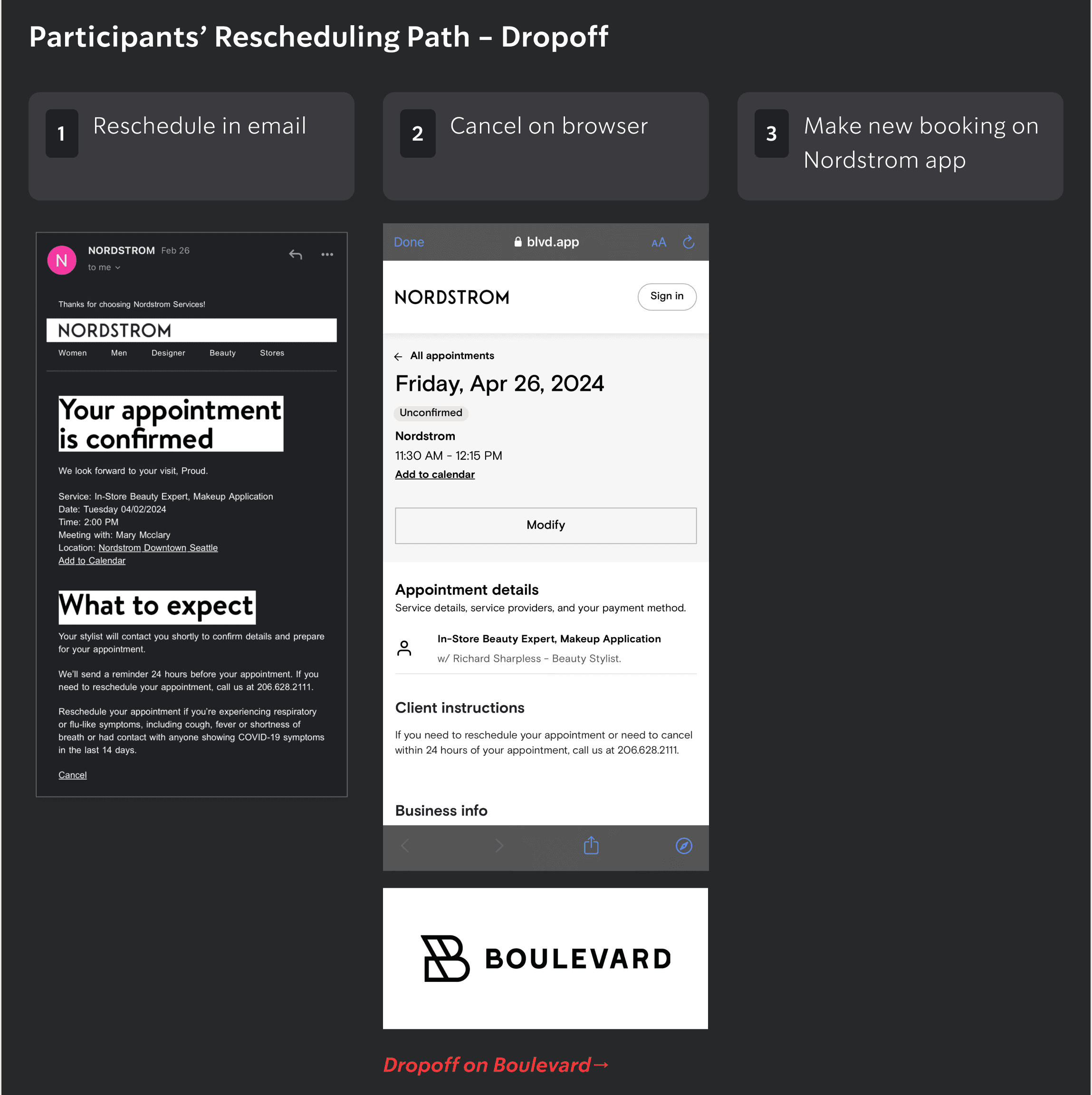
Finding 7.2

Cancellation is the “workaround” path people took in order to reschedule

“I do these things at 11pm at night. I'd have to put in on my calendar for the next day...that’s just a pain. I might just call Sephora at this point...cause you can just walk in”

“If you can change your flight on Southwest...I feel like makeup (appointments) should be easier” [P5]

“You can't really modify, don't want to have to do the whole process again” [P5]
•Appointment status on email doesn’t match Boulevard status
•Modify → Cancel
Severity: High

Task 7

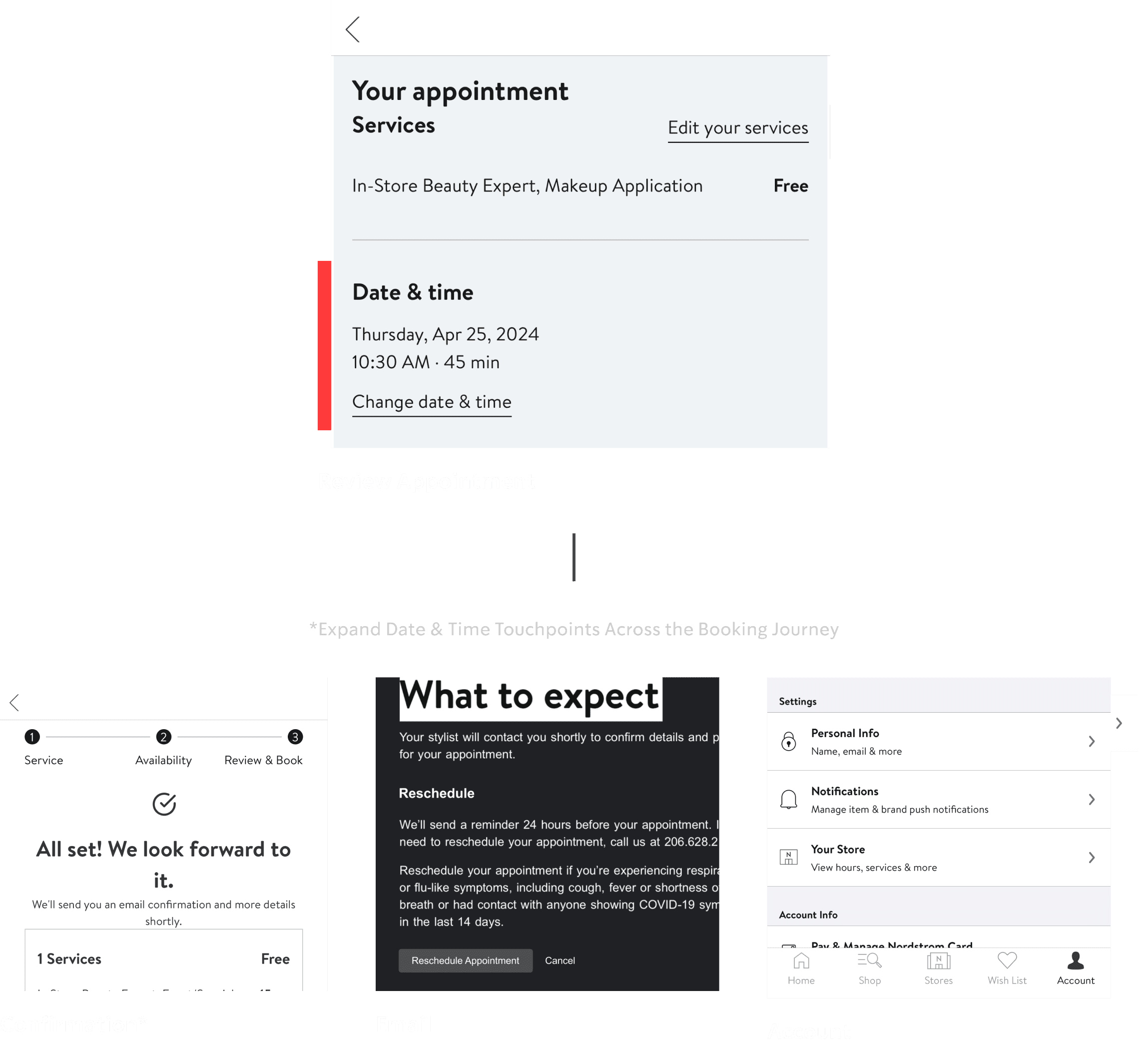
Recommendation 7.3

Make it less cumbersome to change date and time (reschedule)
1.“Change date & time” already exists. Expand touch points to:
•Confirmation
•Email
•Account
2.“Modify” > “Cancel”
Severity: High
Quick FixLong Term

Next steps

Next Steps

Quick Wins

T2Medium

Service category terms didn’t match participant’s mental models

RecA/B test copy alternatives and add context to inform selections
Success Measure# of drop-offs or selection errors in appointment type
T3Medium

Beyond brands, participants expect more information on staff profiles

RecAdd more bio information on staff profiles
Success MeasureTest % of bookings with “no preference” vs. direct bookings with stylist
T7High

People were unable to reschedule

RecIncrease scannability of key CTAs in email
Success MeasureValidate through email testing

Next steps · Short and long term

Quick Wins

T1High

Many participants were not able to find appointments immediately

RecHighlight appointment entry points on Store to increase visibility for the short term
Success MeasureTest # of clicks on before and after

Long Term

T1 & T7High

Appointment discovery and rescheduling are the most difficult tasks

Rec• Centralized appointment system• Validate this approach through research & lo-fi testing
Success Measure• Rise in appointment bookings• Rise in reschedules and reduction of cancellations